UX Relaunch: Laboratory information management system
UX-Neugestaltung eines Labor-Informations-Management-Systems mit Fokus auf intuitive Bedienbarkeit und Prozessoptimierung
Services
- UX Research & User Interviews with Laboratory Staff
- Design Thinking Workshops for Process Optimization
- Information Architecture for Complex Data Structures
- Design System Development with Scalable UI Patterns
- Usability Testing with Real Laboratory Workflows
- Interaction Design for Data-Intensive Interfaces
- Responsive Design for Desktop and Tablet Usage
- UX Guidelines & Pattern Library Documentation
Technologies
Design & Methods
 Figma
What is a LIMS?
A Laboratory Information Management System (LIMS) is software for managing laboratory samples and associated data. It automates workflows, manages samples, and delivers validated, traceable results for regulated environments.
Project Overview
I led the UX/UI redesign of a Laboratory Information Management System (LIMS) for Triestram & Partner. The project focused on modernizing the user interface, simplifying complex workflows, and improving daily operations for laboratory professionals in ISO 9001 regulated environments.
The Challenges
Complex Data Structures
Laboratory workflows require large volumes of data that must remain readable, performant and easy to navigate
Design System Gaps
Lack of consistency in UI components made it difficult to scale and ensure predictable behaviors
Legacy Usability
Accumulated features led to complex navigation and inefficient workflows
Multiple Requirements
Balancing ISO-driven processes, user feedback and system constraints
The Process
Understand the System
Legacy constraints, workflows and user feedback analysis
Define Concepts
Navigation, interaction rules and information architecture
Build the System
UX guidelines, patterns and design system consolidation
Apply & Validate
Screens, flows and implementation feedback
Understanding the Existing System
Inconsistent Navigation
- Deep, irregular navigation structure
- Hard to predict information architecture
Overloaded Screens
- Too many tabs and sub-sections
- Cognitive overload due to missing hierarchy
Define Use Concepts
Data Interaction & Display Model
Defines how large laboratory datasets are loaded, displayed and explored
Navigation Model
Clear distinction between pages, tabs, sub-navigation and sheets
Interaction Model
Sheets and overlays for contextual work without losing the main view
Establishing UX Guidelines
Layout & Hierarchy Guidelines
Stable page frame with title, action bar and content zones
Action & Interaction Guidelines
Page-level actions always in Action Bar, component actions remain local
Data-Heavy Display Guidelines
Single-scroll behaviour with fixed-height components
Designing Patterns & Components
Sample Overview Panel
Contextual panel providing structured overview of laboratory entity
Action Bar
Centralises page-level actions in predictable location
Overlay Sheet
Focused layer for creation and secondary tasks
Screens & Flows
Core Laboratory Workflows
Sample lifecycle flows from creation to validation
Detail & Editing Screens
Push Sheets for seamless access to details without losing context
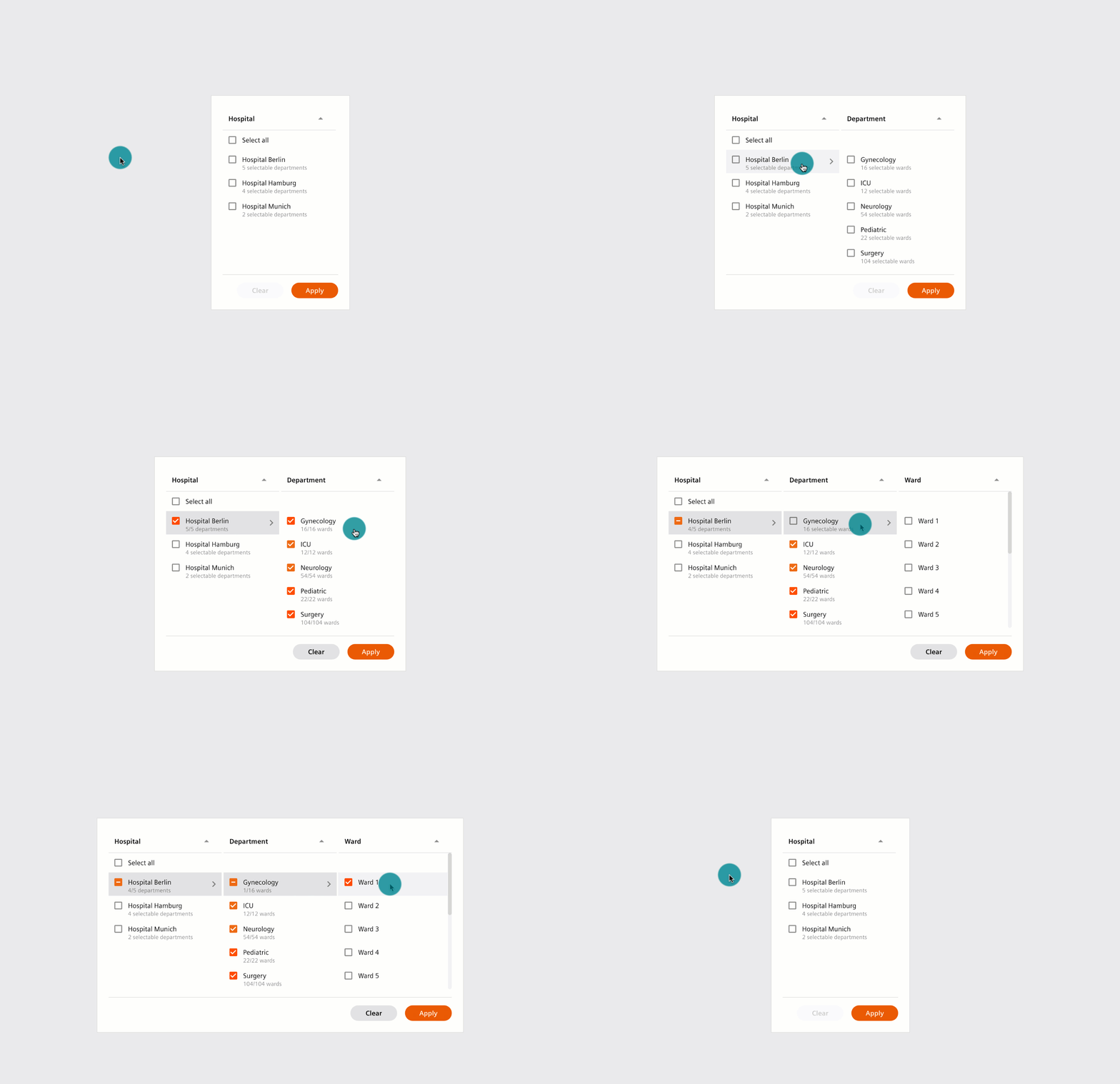
Advanced Filters
High-density tables with sticky headers and predictable filters
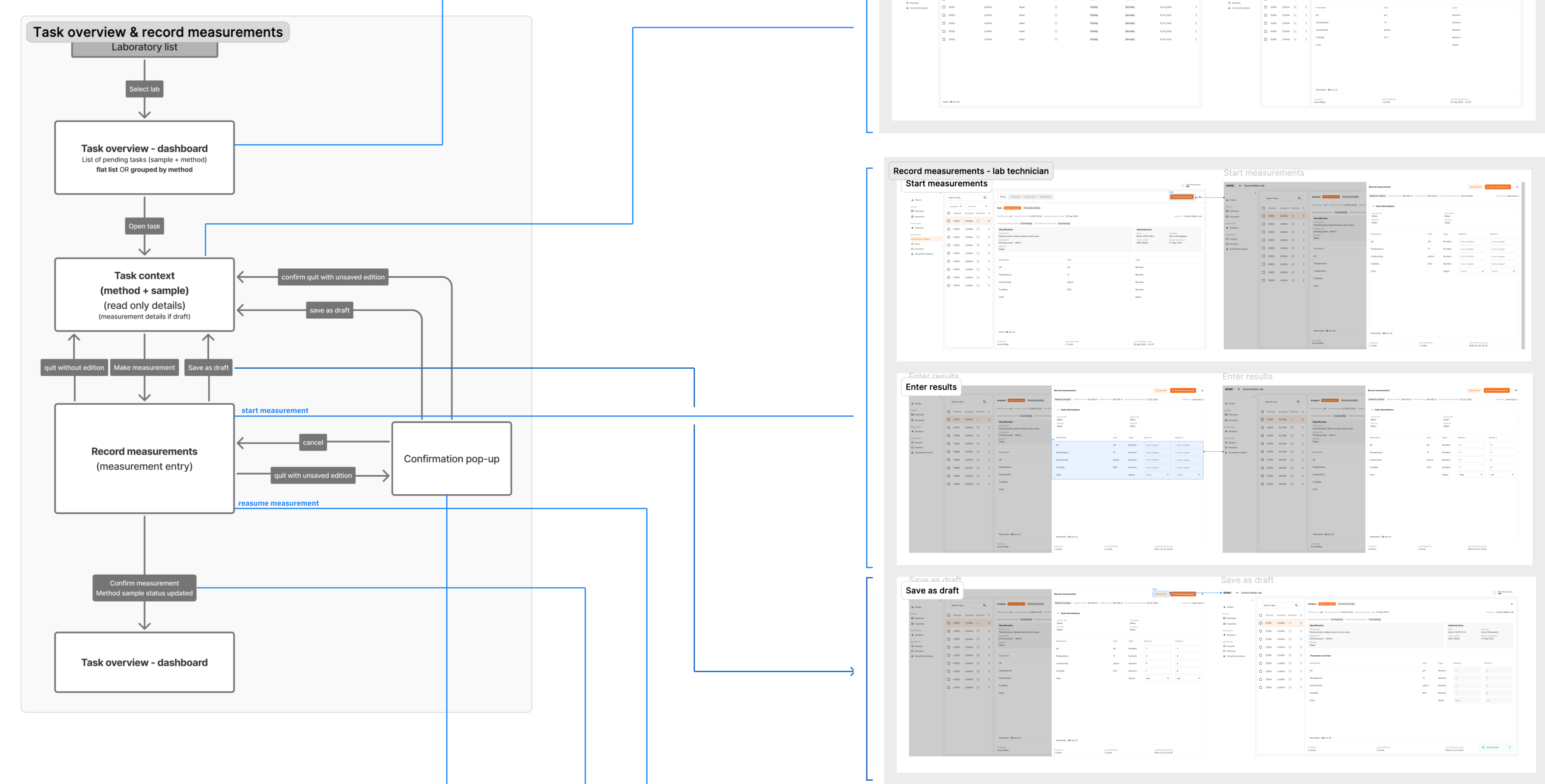
Task Overview
Tasks can be organized in worklists and correspond to the execution of methods. This feature is linked to record measurements, enabling efficient workflow management.
Measured Impact
Reduced workflow time
Fewer clicks for key actions
Fewer navigation support tickets
Faster perceived loading time
Faster data access
No nested scrollbars
Screens aligned with UX guidelines
Faster design-dev cycles
Component reuse across modules
Next 5 weekdays
...
...
...
...
...